View the "Getting
Started" Manual in PDF format
Mdbus PDF Mail Order Form
Mdbus Ordering Information
 General:
Modbus for Windows provides an interactive tool for development, data acquisition, monitoring, and testing of systems employing the MODBUS protocol. This tool provides the interface between the serial or I/P port connected to the MODBUS device and the Window's environment.
Environment:Runs on Window's versions NT or higher. Serial or I/P port for each Mdbus instance.
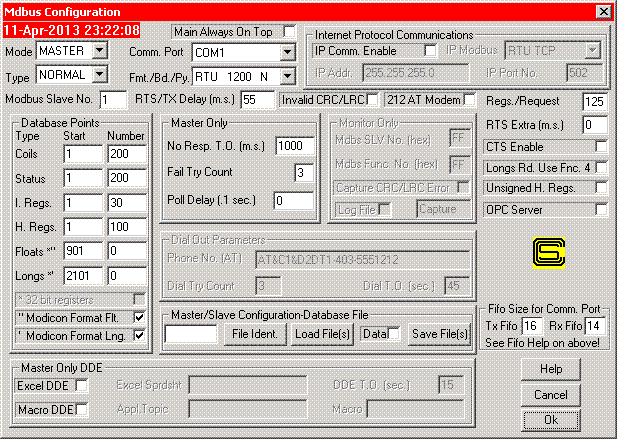
Configuration:Fully configurable via drop down menus - start and number of data type. Unique configurations can be defined, saved, and reloaded. Multiple instances can be invoked.
Operation:MODBUS RTU or ASCII protocol. Separate display window for each data type.
Master
Simulator:Permits polling of designated slave unit. Indicates current communication status. Maintains communication statistics. Function codes one to four used for data acquisition, five and six for control. Supports modem dial out with AT command set. Received data can be printed. Displays TX and RX messages in monitor Window for communications testing.
Slave
Simulator:Responds to function codes one to four with user specified data. Function codes five, six, fifteen, and sixteen are displayed on a control window. Automatic pertubation of data for Host alarm and trend testing. Displays TX and RX messages in monitor Window for communications testing.
Monitor:Permits viewing of MODBUS data passed between devices. By diode coupling, the Tx and Rx lines can be monitored. Selective messages can be configured for viewing. Selection can be based upon Slave number, CRC error, or function. Received messages can be logged to file.
Host:Permits polling of up to 32 different Slaves or configurations. Individual Poll Statistics are kept. Data from all Slaves can be dumped into Excel with one DDE Poke.
Excel
Interface:Direct DDE link via poke. Excel macros may be used to control and configure MDBUS.
DDE
Interface:Programs with DDE support can request data from simulator. This includes applications such as Microsoft Excel, Access and Word.
Modbus
RTU/TCP Communications:Communicate via the Internet or LAN to devices or applications which support the Modbus RTU/TCP protocol. In this mode, Mdbus will function as a Master or Slave.
Optional
OPC Server:Mdbus is now available in two versions One without the OPC Server Option and one with. Calta will continue to upgrade revisions for free. However, upgrades from a non OPC version to the OPC version will cost $50 USD.
Latest version with OPC - 4.02 2018-Oct-11.
Latest version without OPC - 3.55 2018-Oct-11.
Addition of a Test Scada Mode implemented as follows:
The File Ident. would also be used to turn On/Off a Test Scada Mode for Mdbus.
Mdbus must be in Slave mode to implement Test Scada.
The Test Scada Mode would work as follows:
1. The mode would be turned on by putting tstscada in the File Ident text box in the Configuration Window and clicking Load Ident. A popup would appear saying Test Scada Mode On.
2. The mode would be turned off by putting tstscada in the File Ident text box in the Configuration Window and clicking Load Ident. A popup would appear saying Test Scada Mode Off.
3. In Test Scada mode the first data request would result in Mdbus populating data for the polled station if the Slave address matches the configured one or the configured Slave address is 255.
4. The Polled station address the Slave receives (odd or even) from the Master would determine whether the first bit of implemented status or coil values is a 1 or 0. Subsequent bits would alternate ie 10101010.. or 01010101.. .
5. Holding register and Input register values would consist of 2 LS digits matching the last 2 digits of the point number and up to 3 MS digits for the Slave address.
6. Long Integers and F.P. register values would consist of 4 LS digits matching the last 4 digits of the point number and up to 3 MS digits for the Slave address.
7. When Test Scada Mode is implemented, slv no. is shown is all capitals (SLV NO.)
Note! - A time limited fully
functional demo copy is available.
Click here to request a copy.
 Return to Home Page